

For Administrator: This article explains how administrators can manage funders on the Agency Funders form (651).
This guide provides step-by-step instructions on how to add and manage Agency Funders in CARMIS. Agency Funders are used to track organizations that provide funding, and they can be configured to submit information to iCARE if required.
Sections:
Add a New funder:
Step 1: Go to Admin > Agency Configuration > Agency Funders (651). You can also search for Agency Funders or 651 in CARMIS.
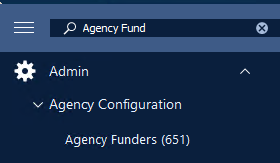
Step 2: The Agency Funders (651) form will open. Click on Add to create a new funder.

Step 3: Enter the Funder Name you want to add.
- Ensure Active field is set to Yes.
- If the funder needs to submit information to iCARE/IRCC, set the "Submit iCARE on this funder?" field to Yes.
- If the funder does not need to submit information to iCARE/IRCC, select No.
- (Optional) Add any description or notes related to the funder, if needed.

Step 3: Click Save to complete the process.

Important note: If the funder submits information to iCARE/IRCC, please follow the this guide to set up eligibility: How to set up Client Eligibility in CARMIS
How to edit funders
Step 1: Click on List to display all the funders.

Step 2: Double-click on the funder you want to update. Then click on the update button.

Step 3: Make the necessary changes and click Save to complete the process.